FormPDF PRO Documentation
FormPDF PRO connects your ConcreteCMS Express forms to automatic PDF generation. When a visitor submits a form on your site, the package can generate a formatted PDF, save it to your file manager, send it by email, and give the submitter a download link — depending on the rule you configure.
How It Works
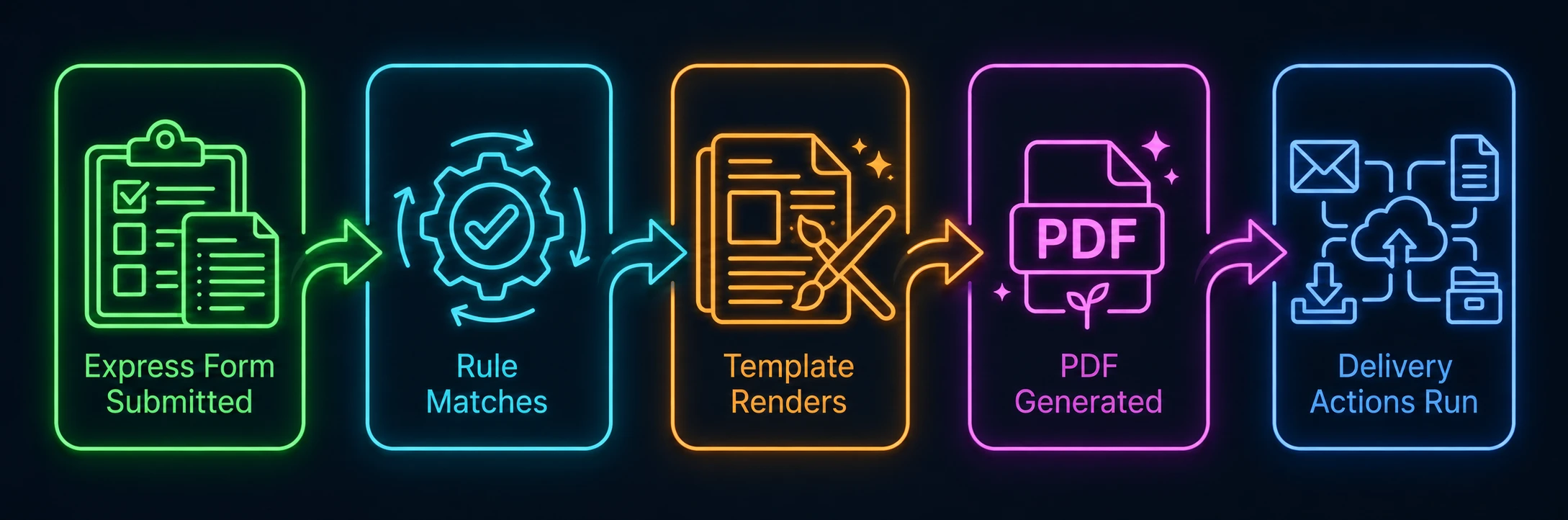
A Rule decides which form triggers PDF generation and what happens next. A Template defines the PDF layout and content. Delivery actions — File Storage, Email, and submitter download — are all configured per rule.
Requirements
- ConcreteCMS 9.4 or later
- At least one Express form created and published on your site
Documentation
New here?
Complete the one-time setup in order: configure defaults, create a template, connect it to a rule, and verify with a test run.
Getting Started →Building templates
Create and manage PDF layouts using the Basic builder, raw HTML, or an external file. Use tokens to insert form values into the output.
Setting up automation
Connect forms to templates, configure delivery actions, and control what submitters see after a successful form submission.
Monitoring & troubleshooting
Inspect rule execution history, diagnose failed PDF generation, review generated files, and check system health at a glance.
Frequently Asked Questions
- What is FormPDF PRO?
- FormPDF PRO is an add-on for Concrete CMS (version 9.4+) that converts Express Form submissions into customized PDF documents automatically upon form submission.
- How are generated PDFs delivered?
- PDFs can be automatically stored in the Concrete CMS File Manager, emailed as attachments to specified addresses, or offered as direct/secure download links to form submitters.
Need help?
If something is not working as expected, start with Execution Logs — it's the fastest way to find out what went wrong. For further support, visit support.nexode-solutions.com.